




![]()
はじめに
FutureVuls では、 vuls によるサーバスキャンや trivy によるコンテナイメージスキャンはもちろんのこと、Amazon Inspector( EC2 / ECR / Lambda )や SBOM の取り込みにも対応しています。より詳細な対応状況は、こちらの「スキャン方法の選択肢と特徴 と 対応環境」をご確認ください!
特定のソフトウェアや、ネットワーク機器を含めたハードウェアの脆弱性を管理する手法としては、 CPE(Common Platform Enumeration) を用いた CPE スキャン という機能を提供しています。
「CPE スキャン」の利用にあたり、登録したいソフトウェア・ハードウェアの「CPE 名」を特定する必要があります。
CPE 名の一覧は、NVD の「Official Common Platform Enumeration (CPE) Dictionary」で配信されています。同サイトの「Search Common Platform Enumerations (CPE)」により Vendor や Product による検索も可能です。
FutureVuls には「CPE 検索」という Vendor、Product から CPE 候補を検索する機能が備わっています。
本ブログでは、CPE 名を CPE のフォーマットを活用して検索する 手法として、go-cpe-dictionary と peco と sqlite3 を組み合わせた方法を説明します。
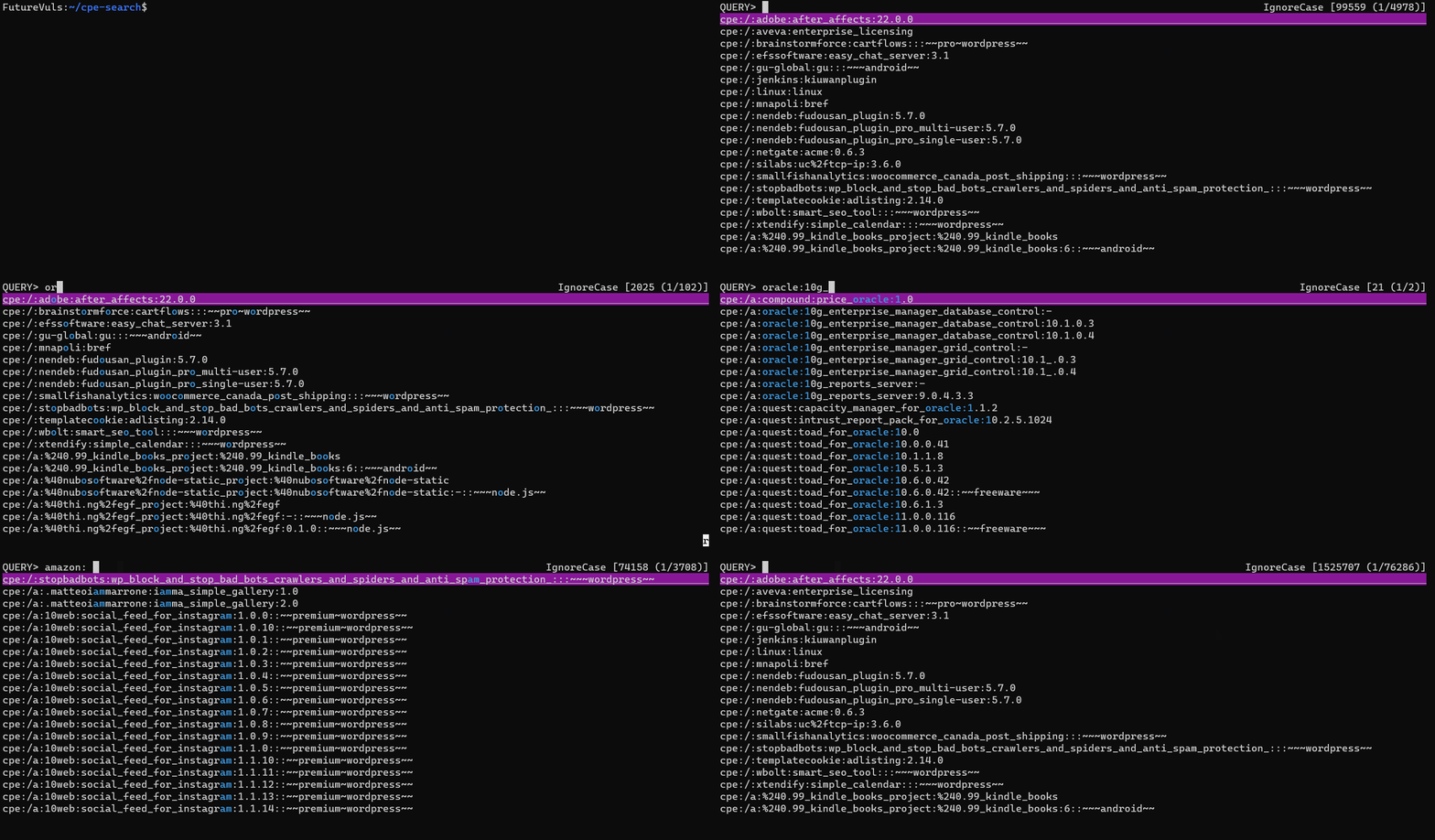
環境構築が完了すると、以下 GIF のようにアクティブな CPE 名の検索が可能となります。
動作環境
本ブログの内容は、Ubuntu 22.04 にて実施しました。
$ cat /etc/os-release
PRETTY_NAME="Ubuntu 22.04.4 LTS"
...
CPE 辞書のダウンロードと検索には、以下のツールを利用します。
| 利用ツール | バージョン |
|---|---|
| go-cpe-dictionary | 0.6.0 |
| peco | 0.5.10 |
| sqlite3 | 3.37.2 |
全体像
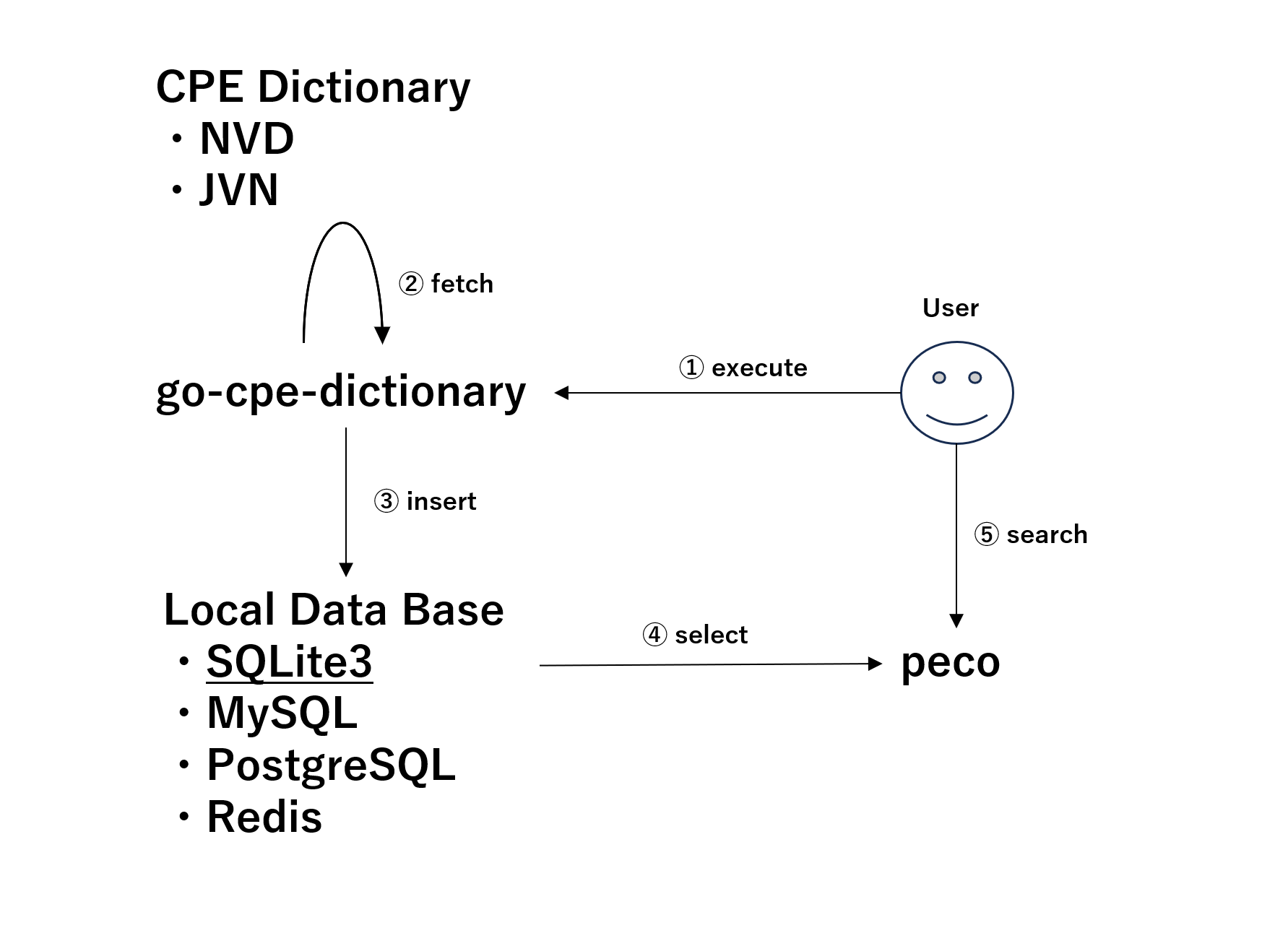
本ブログの大まかな流れを、以下の表に整理しました。
| 操作順番 | 一言で表すと | 作業内容 |
|---|---|---|
| ① | execute | go-cpe-dictionary をインストールする |
| ② | fetch | go-cpe-dictionary により CPE 辞書をダウンロードする |
| ③ | insert | ダウンロードした CPE 辞書を、データベースに格納する |
| ④ | select | データベースから CPE 辞書を取得する |
| ⑤ | search | sqlite と peco をインストールして、CPE 辞書をアクティブに検索する |
CPE 辞書の取得
CPE 検索のために、まずは NVD・JVN から CPE 辞書をダウンロードします。
CPE 辞書の保存先として、go-cpe-dictionary は以下の DB が利用可能です。
- SQLite(デフォルト)
- MySQL
- PostgreSQL
- Redis
本ブログでは、SQLite を用いて CPE 辞書を検索する方法を扱います。
go-cpe-dictionary のインストール
まず、CPE 辞書の「ダウンロード」に利用する go-cpe-dictionary をインストールします。
以降は、ブログ執筆時点で最新の「v0.6.0」を対象としたインストールコマンドを記載します。
以下のコマンドにより go-cpe-dictionary をインストールします。
# 作業ディレクトリを作成する
$ cd ~; mkdir cpe-search; cd cpe-search
# go-cpe-dictionary をダウンロードする
$ wget https://github.com/vulsio/go-cpe-dictionary/releases/download/v0.6.0/go-cpe-dictionary_0.6.0_linux_amd64.tar.gz
...
# tar ファイルを展開する
$ tar -xzf go-cpe-dictionary_0.6.0_linux_amd64.tar.gz
# バージョンを確認する
$ ./go-cpe-dictionary version
go-cpe-dictionary 0.6.0 69719c59658e42958931441fa2c7db8325fd77dc
バージョンの確認コマンドが実行できれば、go-cpe-dictionary のインストールは完了です。
通常のコマンドと同様のため、$PATH 配下に配置する( mv または cp する)ことで、任意のディレクトリでコマンドを実行できるようになります。
# $PATH が設定済みのディレクトリ一覧を確認する
$ echo $PATH | tr ":" "\n"
...
go-cpe-dictionary で実行可能なオプションは --help により確認できます。
本ブログでは fetch を利用して、CPE 辞書を取得します。
go-cpe-dictionary --help
$ go-cpe-dictionary --help
GO CPE Dictionary
Usage:
go-cpe-dictionary [command]
Available Commands:
completion Generate the autocompletion script for the specified shell
fetch Fetch the data of CPE
help Help about any command
server Start CPE dictionary HTTP server
version Show version
Flags:
--config string config file (default is $HOME/.go-cpe-dictionary.yaml)
--dbpath string /path/to/sqlite3 or SQL connection string (default "/home/user/cpe-search/cpe.sqlite3")
--dbtype string Database type to store data in (sqlite3, mysql, postgres or redis supported) (default "sqlite3")
--debug debug mode (default: false)
--debug-sql SQL debug mode
-h, --help help for go-cpe-dictionary
--http-proxy string http://proxy-url:port (default: empty)
--log-dir string /path/to/log (default "/var/log/go-cpe-dictionary")
--log-json output log as JSON
--log-to-file output log to file
Use "go-cpe-dictionary [command] --help" for more information about a command.
go-cpe-dictionary fetch --help
$ go-cpe-dictionary fetch --help
Fetch the data of CPE
Usage:
go-cpe-dictionary fetch [command]
Available Commands:
jvn Fetch CPE from JVN
nvd Fetch CPE from NVD
vuls Fetch CPE from Vuls
Flags:
--batch-size int The number of batch size to insert. (default 100)
-h, --help help for fetch
--threads int The number of threads to be used (default 12)
Global Flags:
--config string config file (default is $HOME/.go-cpe-dictionary.yaml)
--dbpath string /path/to/sqlite3 or SQL connection string (default "/home/user/cpe-search/cpe.sqlite3")
--dbtype string Database type to store data in (sqlite3, mysql, postgres or redis supported) (default "sqlite3")
--debug debug mode (default: false)
--debug-sql SQL debug mode
--http-proxy string http://proxy-url:port (default: empty)
--log-dir string /path/to/log (default "/var/log/go-cpe-dictionary")
--log-json output log as JSON
--log-to-file output log to file
Use "go-cpe-dictionary fetch [command] --help" for more information about a command.
CPE 辞書をダウンロードする
go-cpe-dictionary を用いて、CPE 辞書をダウンロードする方法を説明します。
SQLite のフォーマットで出力する
go-cpe-dictionary はダウンロードした CPE 辞書を SQLite のフォーマットで出力します。
※ --dbpath、--dbtype を指定すれば、PostgreSQL や Redis への格納も可能です。
まず、以下コマンドを実行して、NVD・JVN が配信する CPE 辞書をダウンロードします。
go-cpe-dictionary fetch nvd
# 作業ディレクトリを作成して移動する
$ cd ~
$ mkdir cpe-search
$ cd ~/cpe-search/
# NVD から CPE 辞書を取得する
# $PATH を通していない場合は ./go-cpe-dictionary fetch nvd を実行する
$ go-cpe-dictionary fetch nvd
INFO[06-03|00:32:55] Fetching... URL=https://github.com/vulsio/vuls-data-raw-nvd-api-cpe/archive/refs/heads/main.tar.gz
INFO[06-03|00:34:01] Fetching... URL=https://github.com/vulsio/vuls-data-raw-nvd-api-cpematch/archive/refs/heads/main.tar.gz
INFO[06-03|00:37:22] Inserting new CPEs
1454401 / 1454401 [-------------------------------------------------------------------------------] 100.00% 11923 p/s
go-cpe-dictionary fetch jvn
# JVN から CPE 辞書を取得する
$ go-cpe-dictionary fetch jvn
INFO[06-03|00:45:43] Fetching... URL=https://jvndb.jvn.jp/ja/rss/years/jvndb_2002.rdf
INFO[06-03|00:45:43] Fetching... URL=https://jvndb.jvn.jp/ja/rss/years/jvndb_2003.rdf
INFO[06-03|00:45:43] Fetching... URL=https://jvndb.jvn.jp/ja/rss/years/jvndb_2005.rdf
INFO[06-03|00:45:43] Fetching... URL=https://jvndb.jvn.jp/ja/rss/years/jvndb_2004.rdf
INFO[06-03|00:45:43] Fetching... URL=https://jvndb.jvn.jp/ja/rss/years/jvndb_2007.rdf
INFO[06-03|00:45:43] Fetching... URL=https://jvndb.jvn.jp/ja/rss/years/jvndb_2008.rdf
INFO[06-03|00:45:43] Fetching... URL=https://jvndb.jvn.jp/ja/rss/years/jvndb_2006.rdf
INFO[06-03|00:45:43] Fetching... URL=https://jvndb.jvn.jp/ja/rss/years/jvndb_2009.rdf
INFO[06-03|00:45:43] Fetching... URL=https://jvndb.jvn.jp/ja/rss/years/jvndb_2010.rdf
INFO[06-03|00:45:43] Fetching... URL=https://jvndb.jvn.jp/ja/rss/years/jvndb_2011.rdf
INFO[06-03|00:45:43] Fetching... URL=https://jvndb.jvn.jp/ja/rss/years/jvndb_2012.rdf
INFO[06-03|00:45:43] Fetching... URL=https://jvndb.jvn.jp/ja/rss/years/jvndb_2013.rdf
INFO[06-03|00:45:44] Fetching... URL=https://jvndb.jvn.jp/ja/rss/years/jvndb_2014.rdf
INFO[06-03|00:45:44] Fetching... URL=https://jvndb.jvn.jp/ja/rss/years/jvndb_2015.rdf
INFO[06-03|00:45:45] Fetching... URL=https://jvndb.jvn.jp/ja/rss/years/jvndb_2016.rdf
INFO[06-03|00:45:48] Fetching... URL=https://jvndb.jvn.jp/ja/rss/years/jvndb_2017.rdf
INFO[06-03|00:45:52] Fetching... URL=https://jvndb.jvn.jp/ja/rss/years/jvndb_2018.rdf
INFO[06-03|00:45:52] Fetching... URL=https://jvndb.jvn.jp/ja/rss/years/jvndb_2019.rdf
INFO[06-03|00:45:54] Fetching... URL=https://jvndb.jvn.jp/ja/rss/years/jvndb_2020.rdf
INFO[06-03|00:45:55] Fetching... URL=https://jvndb.jvn.jp/ja/rss/years/jvndb_2021.rdf
INFO[06-03|00:45:56] Fetching... URL=https://jvndb.jvn.jp/ja/rss/years/jvndb_2022.rdf
INFO[06-03|00:45:56] Fetching... URL=https://jvndb.jvn.jp/ja/rss/years/jvndb_2023.rdf
INFO[06-03|00:45:57] Fetching... URL=https://jvndb.jvn.jp/ja/rss/years/jvndb_2024.rdf
INFO[06-03|00:45:58] Fetching... URL=https://jvndb.jvn.jp/ja/rss/jvndb_new.rdf
INFO[06-03|00:45:59] Fetching... URL=https://jvndb.jvn.jp/ja/rss/jvndb.rdf
INFO[06-03|00:46:27] Inserting new CPEs
本ブログ執筆時点では、NVD と JVN の CPE 辞書を合算すると、データサイズは 540MB となりました。
# データサイズを確認する
$ du -h cpe.sqlite3
540M cpe.sqlite3
CPE 辞書のデータは、以下のテーブル定義で格納されています。
categorized_cpesのスキーマ
| Column Name | Type |
|---|---|
| id | integer |
| fetch_type | varchar(3) |
| title | text |
| cpe_uri | varchar(255) |
| cpe_fs | varchar(255) |
| part | varchar(255) |
| vendor | varchar(255) |
| product | varchar(255) |
| version | varchar(255) |
| update | varchar(255) |
| edition | varchar(255) |
| language | varchar(255) |
| software_edition | varchar(255) |
| target_software | varchar(255) |
| target_hardware | varchar(255) |
| other | varchar(255) |
| deprecated | numeric |
sqlite3 コマンドを使うことで、Query による検索が可能です。
Linux環境であれば、以下コマンドにより sqlite3 をインストールします。
# RedHat 系
$ sudo yum install sqlite3 -y
# Debian/Ubuntu 系
$ sudo apt install sqlite3 -y
$ which sqlite3
/usr/bin/sqlite3
sqlite3 により、go-cpe-dictionary が出力した cpe.sqlite3 への SQL 実行が可能です。
# 取得した CPE 名の総数を集計する
$ sqlite3 ./cpe.sqlite3 'select count(1) from categorized_cpes'
1525650
# CPE 辞書から 5 件だけ抽出する
$ sqlite3 ./cpe.sqlite3 'select id, fetch_type, title, cpe_uri from categorized_cpes limit 5'
1|nvd|Mods for HESK 2.6.1|cpe:/a:mods-for-hesk:mods_for_hesk:2.6.1
2|nvd|Debian Advanced Package Tool (APT) 2.0.6|cpe:/a:debian:advanced_package_tool:2.0.6
3|nvd|Vercel Next.js 12.3.2 Canary8 for Node.js|cpe:/a:vercel:next.js:12.3.2:canary8:~~~node.js~~
4|nvd|adrotateplugin adrotate 3\.6\.4|cpe:/a:adrotateplugin:adrotate:3.6.4
5|nvd|libextractor libextractor 0\.3\.8|cpe:/a:libextractor:libextractor:0.3.8
以上で、CPE 辞書のダウンロードと検索環境の構築は完了です。
CPE 辞書に対して、sqlite3 コマンド経由で任意の Query を実施できるようになりました。
CPE 辞書をインタラクティブに検索する
ここまでの環境構築により、NVD とJVN からCPE 辞書を取得する作業は完了しています。
CPE 名に目途がついている場合には、Query 検索時の Where 句で vender や product の指定による絞り込みが可能です。
# "vendoer" 名が "amazon" に完全一致するレコードの検索例
$ sqlite3 ./cpe.sqlite3 'select id, fetch_type, title, cpe_uri from categorized_cpes where vendor = "amazon" limit 10'
42|nvd|Amazon Sockeye 2.2.0 for Python|cpe:/a:amazon:sockeye:2.2.0::~~~python~~
246|nvd|Amazon AWS Software Development Kit (SDK) 2.3.9 for Android|cpe:/a:amazon:aws_software_development_kit:2.3.9::~~~android~~
317|nvd|Amazon AWS SDK for JavaScript 2.117.0 for Node.js|cpe:/a:amazon:aws_sdk_for_javascipt:2.117.0::~~~node.js~~
338|nvd|Amazon AWS Software Development Kit (AWS SDK for PHP) 3.64.12 for PHP|cpe:/a:amazon:aws_software_development_kit:3.64.12:-:~~~php~~
390|nvd|Amazon aws-sdk-java (AWS SDK for Java) 1.11.209|cpe:/a:amazon:aws-sdk-java:1.11.209
693|nvd|Amazon AWS SDK for JavaScript 2.89.0 for Node.js|cpe:/a:amazon:aws_sdk_for_javascipt:2.89.0::~~~node.js~~
707|nvd|Amazon AWS Software Development Kit (aws-sdk-go) 1.42.27 for Go|cpe:/a:amazon:aws_software_development_kit:1.42.27::~~~go~~
716|nvd|Amazon AWS Software Development Kit (AWS SDK for PHP) 3.19.13 for PHP|cpe:/a:amazon:aws_software_development_kit:3.19.13:-:~~~php~~
1138|nvd|Amazon AWS Cloud Development Kit (AWS CDK) 2.42.0|cpe:/a:amazon:aws_cloud_development_kit:2.42.0
1208|nvd|Amazon aws-sdk-java (AWS SDK for Java) 1.11.219|cpe:/a:amazon:aws-sdk-java:1.11.219
ここでは、CPE をインタラクティブに探す方法として「peco」を用いた手法を紹介します。
peco のインストール
Linux 環境の場合は、以下のコマンドにより peco をインストールします。
# RedHat 系
$ sudo yum install peco -y
# Debian/Ubuntu 系
$ sudo apt install peco -y
$ which peco
/usr/bin/peco
peco は標準入力でリストを受け取ります。
以下のコマンドにより peco の動きを確認してください。
# コマンド実行履歴を peco に渡す
$ history | peco
# 検索文字を入力し、動的に検索する
QUERY>
...
peco による検索
sqlite3 で CPE 名を取得し、パイプラインで peco に渡すことで、CPE 名のインタラクティブな検索ができます。
$ sqlite3 ./cpe.sqlite3 'select cpe_uri from categorized_cpes' | peco
QUERY> IgnoreCase [1525650 (1/56506)]
cpe:/:adobe:after_affects:22.0.0
cpe:/:aveva:enterprise_licensing
cpe:/:brainstormforce:cartflows:::~~pro~wordpress~~
cpe:/:efssoftware:easy_chat_server:3.1
cpe:/:gu-global:gu:::~~~android~~
cpe:/:jenkins:kiuwanplugin
cpe:/:linux:linux
cpe:/:mnapoli:bref
...
# ctrl + c または、Enter により閉じる
検索したい文字列を >QUERY に入力すると、その文字列によりフィルタされたリストが表示されます。
例えば amazon で検索した場合には、以下のリストが表示されます。
QUERY> amazon IgnoreCase [8864 (1/329)]
cpe:/a:2kblater:2kb_amazon_affiliates_store
cpe:/a:2kblater:2kb_amazon_affiliates_store:1.0.0::~~~wordpress~~
cpe:/a:2kblater:2kb_amazon_affiliates_store:1.0.1::~~~wordpress~~
cpe:/a:2kblater:2kb_amazon_affiliates_store:1.0.2::~~~wordpress~~
cpe:/a:2kblater:2kb_amazon_affiliates_store:1.0.3::~~~wordpress~~
cpe:/a:2kblater:2kb_amazon_affiliates_store:1.0.4::~~~wordpress~~
cpe:/a:2kblater:2kb_amazon_affiliates_store:1.0.5::~~~wordpress~~
...
peco の出力内容を確認しながら「検索文字」を変えることにより、文字列のフィルタが自動更新されて、CPE 名のインタラクティブな探索が可能となります。
おわりに
本ブログでは、以下の手法による「インタラクティブな CPE 名の検索方法」を紹介しました。
go-cpe-dictionaryにより、CPE 辞書をローカルにダウンロードする方法peco+sqlite3により、CPE 辞書をインタラクティブに検索する方法